![2617210b577d672136104a4f5660e04f07acf843-removebg-preview.png]](https://help.knowledgeanywhere.com/hs-fs/hubfs/2617210b577d672136104a4f5660e04f07acf843-removebg-preview.png?height=40&name=2617210b577d672136104a4f5660e04f07acf843-removebg-preview.png)
What Is a Certification?
A Certification is a defined program that a learner must complete to attain a recognized, meaningful training goal. Like a learning path or checklist, a Certification consists of one or more training steps and a final exam; a step may include online courses, classroom training, external training, or a test out option. When a learner satisfies all requirements and passes the exam, they are awarded the Certification.
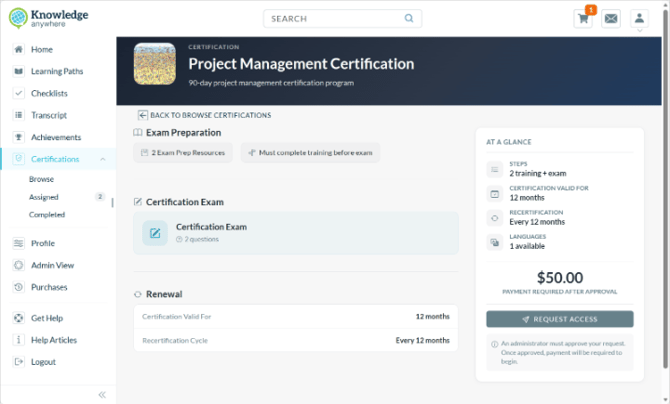
Certifications include verification, auditing, and approval steps that make them very useful for formal certifications.
- Multiple interchangeable completion paths, so learners can demonstrate competency through the method that works best for them.
- Full version management workflow (draft, published, and archived) so you can update requirements or content without disrupting learners who are already mid-certification.
- Built-in approval workflows, allowing administrators to approve requests to enroll in the Certification, evaluate submitted materials, validate exam results, and so on.
- Certification life-cycle support, allowing you to set up a recertification with its own training content, exam, pricing, and certificate, separate from the initial certification.
- Automated reminder emails to learners and administrators for key events, covering the full certification lifecycle.
- Certificates and badges.
- E-commerce, allowing you to charge for certifications if you desire.
- Multiple languages.
1. When Should I Use a Certification?
Learning paths, checklists, and Certifications all allow you to assign training to learners, but offer different capabilities.
- Learning Paths allow you to bundle a set of courses into a structured training program. Learners progress through the required and elective courses in the learning path. Learning paths are the foundation of course-based training in the LMS and are typically assigned through groups or directly to individual learners. For additional flexibility, you can use categories to group learning paths.
- Checklists add the ability to assign a broader mix of activities beyond LMS courses, such as resources, external tasks, text instructions, and sub-tasks, along with stronger administration capabilities, such as due dates and points of contact. Checklists are ideal when learners need to complete activities beyond just taking courses; new hire onboarding is a typical use case for checklists.
- Certifications add sophisticated administration, tracking, versioning, and credentialing to the training pathway. They are designed for formal certification programs that require exam-based validation, ongoing recertification, approval workflows, certificate issuance, and lifecycle management. Use Certifications when training completion alone is not sufficient, like when you need to formally certify, track expiration, and recertify learners over time.
For a complete comparison of the capabilities of learning paths, checklists, and certifications, see What Should I Use: Groups, Learning Paths, Checklists, or Certifications?
Here are some common use cases for Certifications:
- Compliance Certification - Require learners to complete mandatory training steps and pass a final exam to earn a compliance certification, with automatic expiration reminders and recertification cycles to ensure credentials stay current.
- Professional Skills Credentialing - Build a structured program where learners can demonstrate competency through multiple paths (online courses, external training, or test-out), with admin review of submitted evidence before credit is granted. Ecommerce is supported, allowing you to charge for the program if desired.
- Partner or Customer Certification - Offer a paid certification program to external audiences, scoped to a specific microsite.
2. What are the Steps in Setting Up a Certification?
- Begin by configuring the Certification. In this step you will determine if the Certification must be assigned or can be accessed by any learner, set pricing, set completion rules, set prerequisites, set expiration and recertification parameters, and create or upload the certificate. See Creating a Certification.
- Build the certification curriculum. In this step you will add online training, classroom training, external training, and test-out steps to the certification. See Specifying Certification and Recertification Content.
- Build the final assessment, using the LMS’s powerful assessment builder tool. See Assessments Overview.
- Set notifications for learners and administrators.
- Assign learners to the Certification or enable the Certification for self-enrollment. See Assigning Learners to a Certification.
Once you have created the Certification you can monitor and manage learner progress. See Managing Learners in the Certification Process.
Various steps in the Certification process may require administrator approval; for example, a certification may require validation of exam results before completion is recorded. See Managing Approvals for Certifications.
Need Help?
If you have questions or run into issues, you can contact our support team at support@knoweldgeanywhere.com for technical assistance.