![2617210b577d672136104a4f5660e04f07acf843-removebg-preview.png]](https://help.knowledgeanywhere.com/hs-fs/hubfs/2617210b577d672136104a4f5660e04f07acf843-removebg-preview.png?height=40&name=2617210b577d672136104a4f5660e04f07acf843-removebg-preview.png)
Administrators can go to the Learners tab under Certifications to see the status of learners and take actions necessary to manage them during the Certification process. On this tab you see a list of learners who are assigned to or enrolled in the Certification, their enrollment date, and their status:
- Assigned – Assigned by an admin but the learner has not yet enrolled
- Not Started - Assigned/enrolled but not started
- In Progress - Working on steps
- Pending Approval - Awaiting admin/manager sign-off
- Certified - Completed, certification valid
- Expired - Past expiration date, within grace period
- Lapsed - Past grace period, must recertify
- Recertifying - Working on recertification cycle
- Revoked - Admin revoked, can recertify with latest version
- Disallowed - Admin revoked, permanently barred
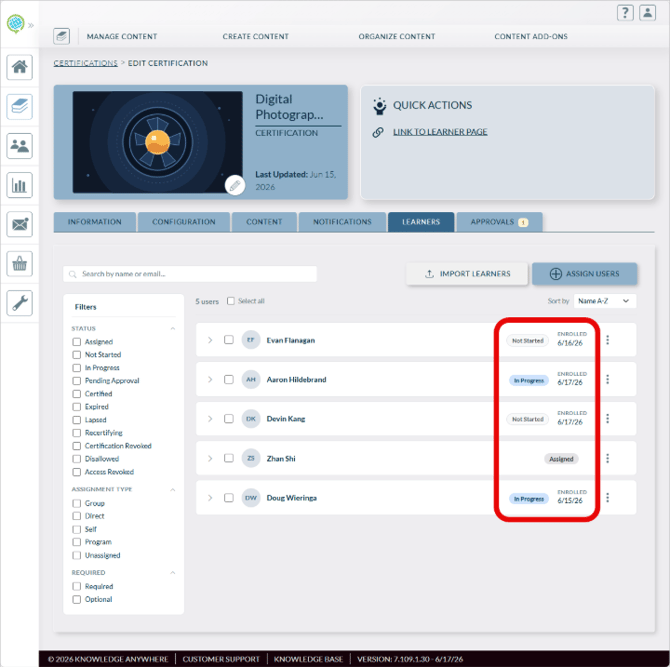
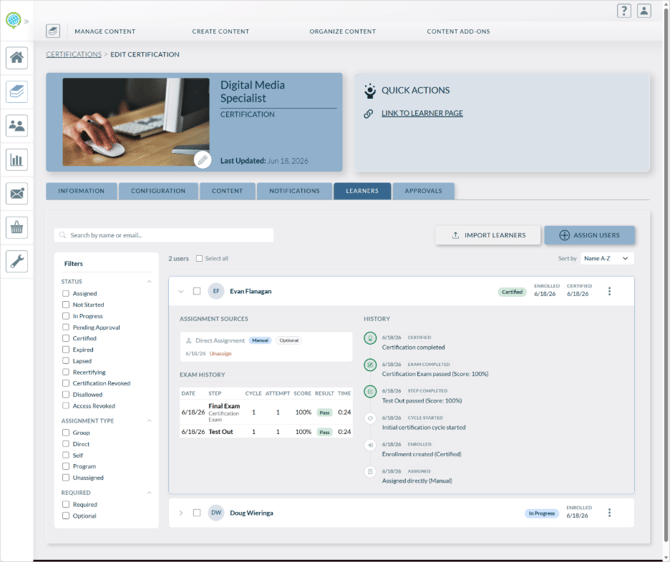
Clicking the arrow on the left of the learner’s name shows additional detail for that learner.
-
Assignment sources shows how the learner was assigned to the Certification, shows the assignment date, and provides the option to unassign the learner.
- Exam History shows all exams the learner has attempted.
- History shows actions related to the learner’s certification.
Actions
Clicking the three dots to the right of the learner’s name reveals actions that can be taken.
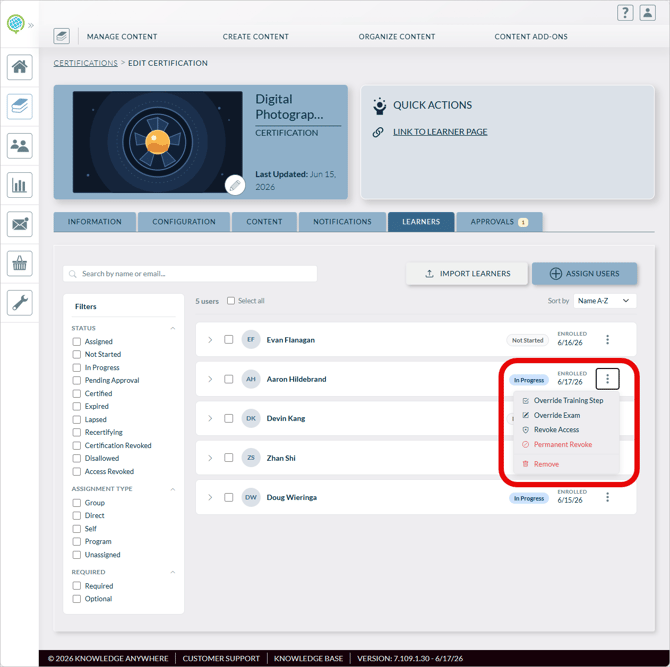
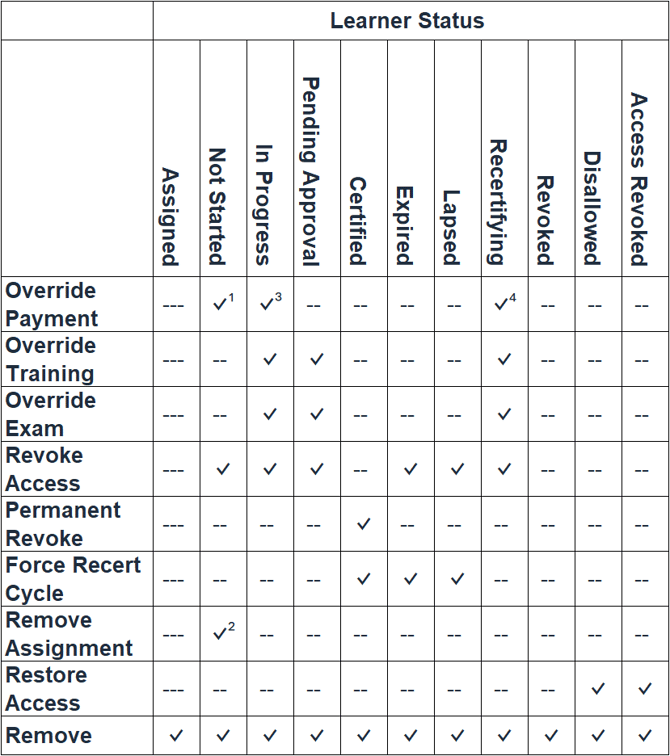
The available actions depend on the status of the learner. These are all the actions and the table below shows when each action is available.
- Override Payment - If the Certification requires payment and you want to grant a learner access without requiring a purchase, use Override Payment. This waives the payment requirement for that learner and initializes their progress so they can begin immediately. The learner's dashboard will show a Payment waived by your administrator indicator.
Note: Override Payment can only be applied while the learner is in Not Started, In Progress, or Recertifying status. It cannot be applied once the learner is certified.
- Override Training - Use Override Training to mark all training steps as complete for a learner, bypassing the need for them to complete the training content. This is available while the learner is In Progress, Pending Approval, or Recertifying.
- Override Exam - Use Override Exam to mark the exam step as passed for a learner without them taking the exam. This is available while the learner is In Progress, Pending Approval, or Recertifying.
- Revoke Access - Use Revoke Access to end a learner's active enrollment. This is available for learners who are Not Started, In Progress, Pending Approval, Expired, Lapsed, or Recertifying. Revoking access removes the learner from the active enrollment without permanently barring them.
- Force Recertification Cycle - Use Force Recertification Cycle to require a certified learner to recertify using the latest published version, regardless of their current expiration date. This is available for learners who are Certified, Expired, or Lapsed. The learner's current certificate is revoked and they must recertify.
- Permanent Revoke - Use Permanent Revoke to permanently bar a learner from this Certification . This is only available for learners who are currently Certified. Once permanently revoked, the learner cannot start a new cycle unless an admin restores access.
- Restore Access - Use Restore Access to re-enable a learner who has been permanently revoked or administratively blocked. After restoring access, the learner can begin a new recertification cycle.
- Remove - Removes the assignment.
Caution: A Test out Exam cannot be reset. Once a learner has completed it, it is permanent.
1 If payment required & not paid
2 Manual only
3 If exam has not been started nor paid for
4 If recert payment & not paid