![2617210b577d672136104a4f5660e04f07acf843-removebg-preview.png]](https://help.knowledgeanywhere.com/hs-fs/hubfs/2617210b577d672136104a4f5660e04f07acf843-removebg-preview.png?height=40&name=2617210b577d672136104a4f5660e04f07acf843-removebg-preview.png)
What Microsites Are Used For
Microsites are ideal when you need to provide training to:
-
External audiences (customers, contractors, members, etc.)
-
Channel partners (resellers, distributors, franchises)
-
Groups that need different branding and messaging than your main portal
-
Groups that require different profile attributes than your primary site
Benefits of Microsites
-
Audience-specific branding: tailor the look and messaging for each group.
-
Clean separation: keep learners organized by audience, program, or partner.
-
One LMS to manage: deliver different portal experiences without maintaining multiple LMS instances.
-
Simpler learner access: each group has a dedicated URL to start from.
-
Reduced login confusion: learners are tied to their microsite and will be redirected if they try another portal.
How to Set Up a Microsite
To request a microsite, contact Knowledge Anywhere Support with:
-
Your company name and Site Name
-
Your desired microsite URL (example:
SITENAME.knowledgeanywhere.com)
Note: URLs must follow the SITENAME.knowledgeanywhere.com format.
We can create the new site within roughly 48–72 hours and will notify when it's complete.
Managing Microsites
Microsite Admin
A user can be designated as a Microsite Admin, that can serve as the primary administrator for that specific microsite. They can manage specific settings for that specific microsite such as:
- Branding and portal appearance settings
- Content assigning
- Learner Management
This allows a microsite admin to have a level of autonomy to function and carry out the duties of the microsite.
Logging in to a Microsite
Administrators can easily log in to another microsite (provided they have been granted access).
- Go to Settings > Site Personalization > Personalization.
- Click the three-dots menu for the microsite you wish to log in to.
- Click Login to this Site.
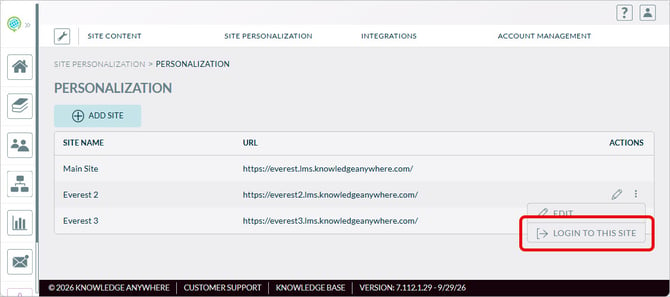
This authenticates the admin into the selected microsite without requiring the approriate microsite to be selected in profile settings. Upon returning to the admin view, admins are automatically redirected to their home admin site.
Site Associations (Restricting Content by Microsite)
Microsites support Site Associations, which allow you to dictate content availability to specific microsites. This is helpful when different audiences and Microsite Admins should only see training intended for them. Content such as Groups, Courses, and Learning Paths will have an option called Admin Access where a global admin can apply Microsite to associate the content with. That will allow the Microsite Admin for that microsite to manage that content.
With Site Associations, you can:
- Assign content to one or more microsites
- Ensure microsite admins only have access to training associated with their microsite
- Prevent unintended overlap between partner/customer training catalogs
Assigning Learners to Microsites
You can assign learners to a microsite by:
-
Using registration codes and selecting the appropriate Site Name
-
Manually assigning learners to a microsite
- Importing learners and designating the Microsite name in the Site column
Once a learner is associated with a microsite, they’ll log in through that portal and will be redirected if they attempt to log in elsewhere.
Microsite Settings
Microsite settings can be adjusted by site, allowing for endless configurations to fit the Microsite's use case. Microsites can be customized by way of settings like:
-
Personalization can allow for images and logos unique from the main site
-
Site options, such as additional assessment time and password reset timers can be adjusted
- FAQs, support pages, and EULA can be configured by microsite, either being exclusive or shared amongst them
Note: Default Microsite settings will inherit the Main Site's settings when created.
If you have additional questions about Microsites, or interested in setting one up in your Knowledge Anywhere LMS, please reach out to support@knowledgeanywhere.com