![2617210b577d672136104a4f5660e04f07acf843-removebg-preview.png]](https://help.knowledgeanywhere.com/hs-fs/hubfs/2617210b577d672136104a4f5660e04f07acf843-removebg-preview.png?height=40&name=2617210b577d672136104a4f5660e04f07acf843-removebg-preview.png)
[New Feature] - Microsite Admin
The Microsite Admin introduces a limited admin role that allows a customer or partner to manage only their own microsite within the LMS without giving them full global admin access.
At a high level, it lets organizations delegate day‑to‑day administration to microsite owners while keeping data, content, and permissions safely isolated.
Microsite admins can:
- Add learners manually or via import (imports are automatically locked to their microsite)
- Manage learners, groups, and registration codes only within their microsite
- Create and manage groups where their site is pre‑associated.
- View and assign only courses and learning paths associated with their microsite
- See learner transcripts (read‑only) for context, even if courses came from other sites
- Edit certain microsite settings and personalization (text, images, support email)
Microsite admins cannot:
- Access or manage other microsites
- Modify global settings or system‑wide configurations (EX: SAML, API access)
- Create or delete custom fields
- Download or export protected course content (EX: SCORM files when locked)
- Act outside their one‑to‑one microsite assignment
[New Feature] Content Distribution
The word, Association comes up a lot when discussing microsites and the Microsite Admin. The Content Distribution feature is central to making microsites truly separate from each other with minimal overlap.
Global Admins have a dedicated page via the Content section called "Admin Access" to view distribution coverage across content at a glance. They can bulk adjust distribution of certain content pieces from this grid, associating them with specific microsites.
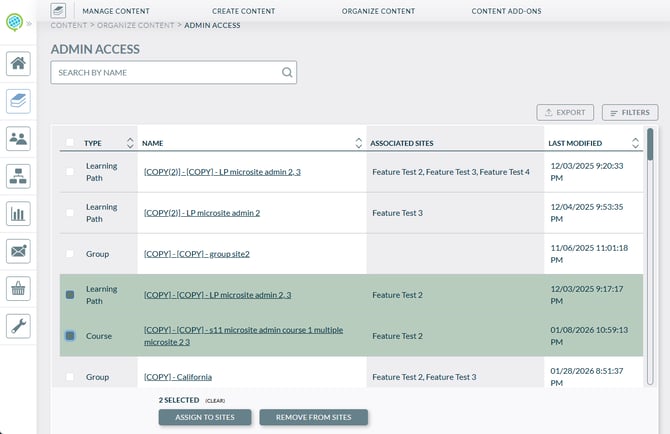
Assign Microsite Associations in bulk:
-
Select several pieces of content
-
Selecting items reveals a bulk actions toolbar at the bottom::
-
Assign to Sites - opens a site selection modal
-
Remove/Assign Access - opens a site removal modal (i.e., remove associations, and/or re-assign)
-
[Video Course] Vimeo Course Progress
Fixed an issue where if there was an inactive video with a completion percentage, the active video adhered to that completion percentage. Completion percentage on the active video will be honored.
[Assessment Course] - Retake Rules Preventing Course Deletion
If an Assessment had retake rules configured, the course was unable to be deleted.
[Assessment Course] - Assessment Name sometimes didn't autopopulate
Fixed an issue when creating an assessment, the name didn't automatically populate. If following standard creation, Assessment name should now auto-populate.
[Admin] - Image Upload - Cancel Button Disappearing
Under certain conditions when uploading an image, the cancel button would disappear during the cropping step. The cancel button will remain visible during the entire stage.
For any questions about this release, please reach out to support@knowledgeanywhere.com