![2617210b577d672136104a4f5660e04f07acf843-removebg-preview.png]](https://help.knowledgeanywhere.com/hs-fs/hubfs/2617210b577d672136104a4f5660e04f07acf843-removebg-preview.png?height=40&name=2617210b577d672136104a4f5660e04f07acf843-removebg-preview.png)
.png?width=670&height=168&name=Email%20Header%20(1).png)
New tools. New updates. New reasons to log in.
LMS Updates
We’ve added a new administrator type, Microsite Administrator, that allows organizations to delegate day‑to‑day administration of the microsites while keeping global permissions, data, and content safely isolated. Here’s an example. This user is a Microsite Admin for the Feature Test 2 microsite.
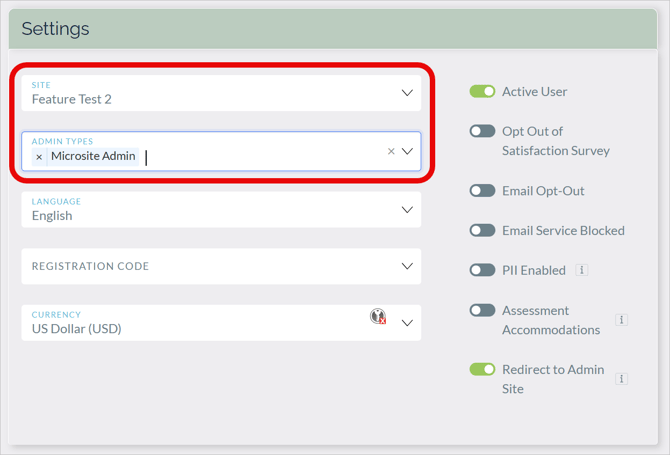
For details, see the LMS Admin Roles Overview Help article.
Content items created by a microsite admin are automatically associated with their microsite.
Global administrator rights remain unchanged, meaning that global administrators can manage all content items across all microsites. Global administrators can now view Content > Organize Content > Admin Access to see which content items are associated with which microsites.
We’ve also added flexible, granular control over the content items that microsite administrators can see and manage. Each course, learning path, group, and resource can now be associated with a microsite, meaning that only admins for that microsite can manage, filter, bulk adjust, or report on it. Here’s an example where a resource has been made available to administrators of two microsites.
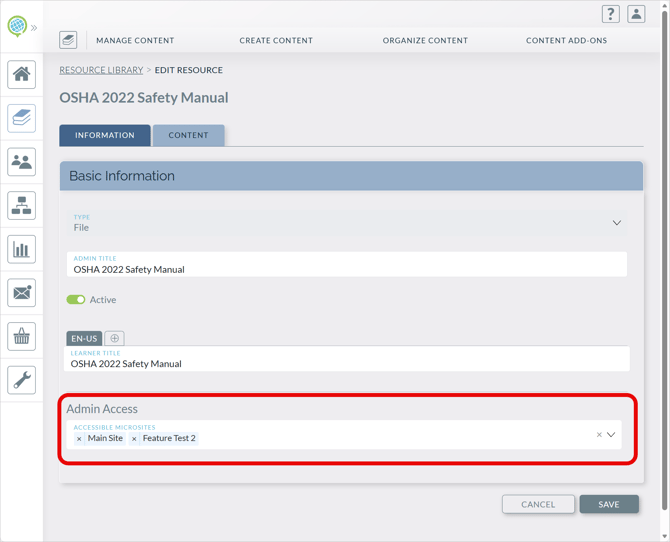
Content items created by a microsite admin are automatically associated with their microsite.
Global administrator rights remain unchanged, meaning that global administrators can manage all content items across all microsites. Global administrators can now view Content > Organize Content > Admin Access to see which content items are associated with which microsites.
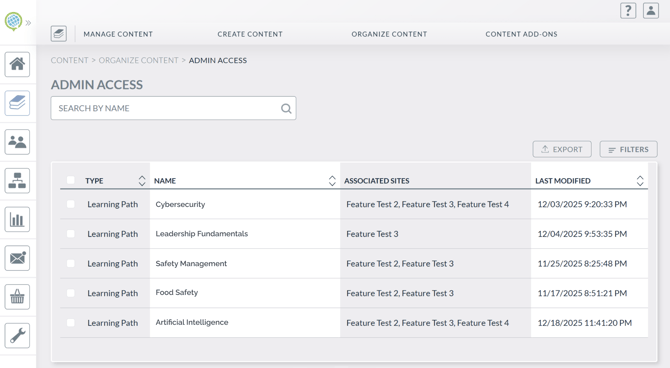
If you’re a microsite user, we encourage you to check out the resources in this Knowledge Drop to make sure you’re getting the most out of microsites. There are also more details in our Maintenance Notes for this release.
If you don’t use microsites and are interested, contact us.
We’ve been busy fixing issues as well, addressing Vimeo course progress, exam retakes, assessments, and image uploads. Details are in the Maintenance Notes.
Featured Article: Importing Learners
When was the last time you checked out our Help Center? It’s a great resource for getting the most from your LMS.
-
If you want to learn more about Microsites, our Microsites Overview article is a great place to start.
- If you want to customize the appearance of your microsite, this article may be helpful.
If you have any questions about microsites, let us know!
If you have any questions or would like support using these new features, please reach out to our Customer Success Team at support@knowledgeanywhere.com as we are happy to help!