![2617210b577d672136104a4f5660e04f07acf843-removebg-preview.png]](https://help.knowledgeanywhere.com/hs-fs/hubfs/2617210b577d672136104a4f5660e04f07acf843-removebg-preview.png?height=40&name=2617210b577d672136104a4f5660e04f07acf843-removebg-preview.png)
The Directed Learning Report includes:
- Courses directly assigned to a learner.
- Courses that belong to a Learning Path that was directly assigned to the learner.
It does not include:
- Self-enrollments
- Assignments granted indirectly via groups or auto-enroll rules (unless the learner also has a direct assignment)
The report automatically consolidates if a learner has both a direct course assignment (via groups) and receives the same course via a direct assignment. You’ll see a single learner–course row.
To run the Directed Learning Report:
- Go to Reports > Course Reports > Directed Learning.
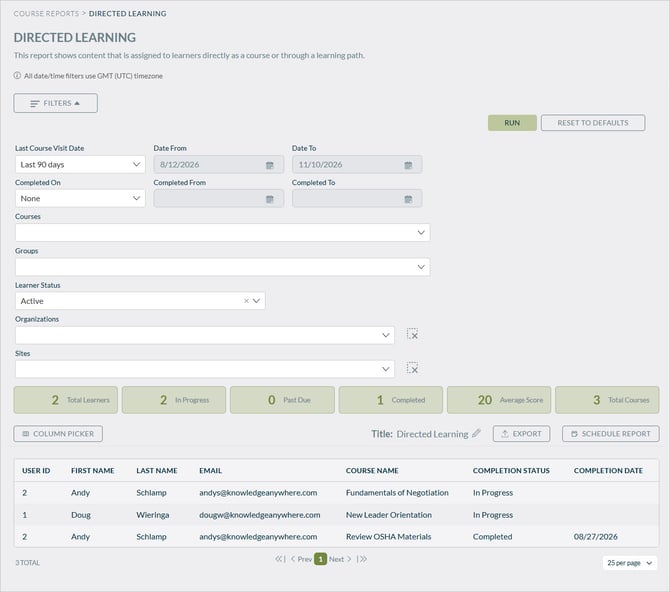
- Specify the filter criteria. You can filter on:
- Date
- Courses
- Groups
- Learner Status - All, Active, or Inactive
- Organizations - Click Add Filters to see this option.
- Sites - Click Add Filters to see this option.
- To control what columns show in the report, click the Column Picker.
- Click Run. You will see the report.
- To export the report, click Export.
- To schedule the report, click Schedule.
Need Help?
If you have questions about this release or encounter any issues, please contact your system administrator or LMS support at support@knowledgeanywhere.com.