![2617210b577d672136104a4f5660e04f07acf843-removebg-preview.png]](https://help.knowledgeanywhere.com/hs-fs/hubfs/2617210b577d672136104a4f5660e04f07acf843-removebg-preview.png?height=40&name=2617210b577d672136104a4f5660e04f07acf843-removebg-preview.png)
Checklists help ensure that required activities are clearly communicated, centrally organized, and easy to track. For learners, this creates a more guided and transparent experience. For administrators, it provides a practical framework for assigning tasks, monitoring progress, and supporting completion across individuals or groups.
Purpose of the Feature
The Checklists feature is intended to help organizations:
-
Organize required learner tasks in a single, easy-to-follow location
-
Support structured programs such as onboarding, certification, and compliance initiatives
-
Improve visibility into learner progress and completion status
-
Reinforce accountability through deadlines and reminders
-
Provide administrators with reporting tools to identify completion trends and follow up where necessary
How Checklists Support Learners
For learners, a checklist serves as a centralized guide to required tasks and milestones. It reduces uncertainty by showing exactly what needs to be completed and in what order. Depending on how the checklist is configured, tasks may include assigned courses, learning paths, documents to review, forms to complete, external resources, or offline activities such as meetings or introductions.
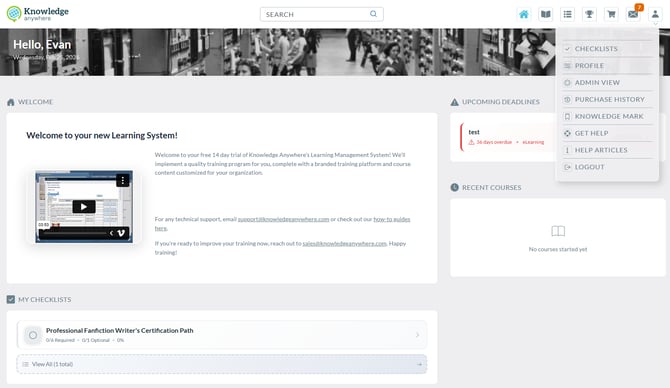
The checklist also helps learners remain aware of their progress by displaying task statuses and overall completion. Where deadlines apply, due dates are presented clearly so learners can prioritize accordingly. Notifications may also be used to remind learners of assignments, upcoming due dates, or overdue items.
Learner Experience at a Glance
From the learner perspective, the checklist functions as a guided task list within the LMS. Learners can use it to:
-
View all assigned checklist items in one place
-
Open and complete each task directly from the checklist
-
Monitor statuses such as Not Started, In Progress, and Completed
-
Track overall progress through a progress indicator
-
Identify due dates and prioritize urgent items
-
Receive reminders related to assignments and deadlines
This experience helps create a clearer path through required activities and reduces the likelihood that important steps will be missed.
How Checklists Support Administrators
For administrators, the feature provides a way to create and manage structured task lists that can be assigned to learners based on organizational needs. Checklists can be used to standardize required learning activities, improve consistency across learner groups, and simplify progress tracking.
Administrators can build new checklists, define the required tasks, assign those checklists to learners, and update them over time as programs evolve. Reporting tools provide visibility into how learners are progressing and which checklist items may require additional follow-up or support.
Administrator Experience at a Glance
From the administrator perspective, the checklist serves as both an assignment tool and a progress management tool. Administrators can use it to:
-
Create structured checklists for specific programs or audiences
-
Add multiple task types depending on the requirement
-
Assign checklists to individuals or groups based on defined criteria
-
Monitor learner progress and completion activity
-
Review reporting data to identify overdue work or incomplete tasks
-
Maintain and adapt checklists over time without losing visibility into prior usage
Components of a Checklist
The Checklists feature generally includes the following components:
1. Checklist Creation and Configuration
Administrators can create a checklist and define its purpose, title, and learner-facing description. This allows each checklist to reflect a specific business need, such as new hire onboarding, annual compliance, department-specific training, or role preparation.
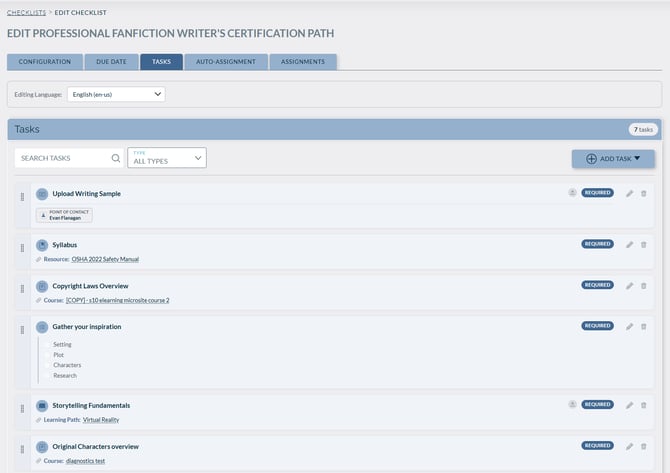
2. Task Assignment Structure
Each checklist is made up of individual tasks that learners are expected to complete. Tasks may be tied to LMS content (courses, supporting resources, external links, or manually completed actions.
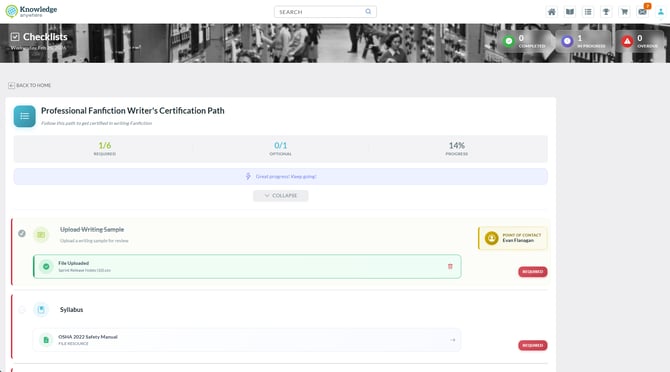
3. Progress Tracking
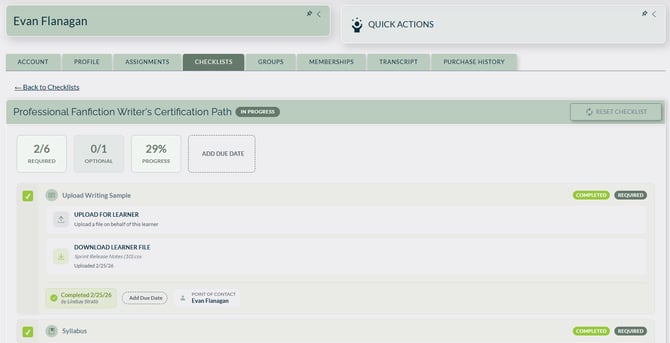
Learners can view task-level statuses and overall progress, while administrators can track completion across assigned learners through available reports.
Learner view progress
Admin Progress view for the Learner
4. Due Dates and Notifications
Where configured, checklists can include deadlines and automated communications to help learners remain on schedule and aware of outstanding requirements.
5. Ongoing Management
Administrators can update, revise, clone, or retire checklists as organizational needs change, while maintaining records of learner activity.
Common Use Cases
Organizations may use checklists in a variety of ways, including:
-
New hire onboarding
-
Role-based readiness programs
-
Compliance and policy acknowledgment workflows
-
Certification preparation
-
Department- or team-specific training initiatives
-
Recurring operational processes that require documented completion
Need Help?
If you have questions or run into issues with your checklist, you can:
-
Visit the Help Center inside the LMS
-
Reach out to your HR team or manager
-
Contact our support team at support@knoweldgeanywhere.com for technical assistance