![2617210b577d672136104a4f5660e04f07acf843-removebg-preview.png]](https://help.knowledgeanywhere.com/hs-fs/hubfs/2617210b577d672136104a4f5660e04f07acf843-removebg-preview.png?height=40&name=2617210b577d672136104a4f5660e04f07acf843-removebg-preview.png)
Where to Find Your Checklist
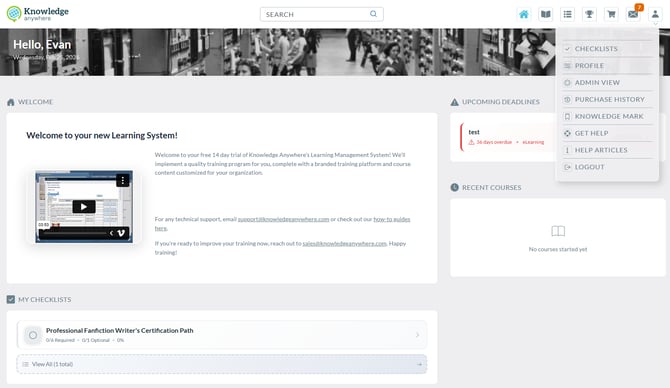
Once you log in to the LMS, you’ll see the Checklist on your Home Page. You can also access it anytime through the Checklist tab in the navigation menu in the upper right.
Your checklist will display all required tasks in one place, so you always know what’s next.
How the Checklist is Organized
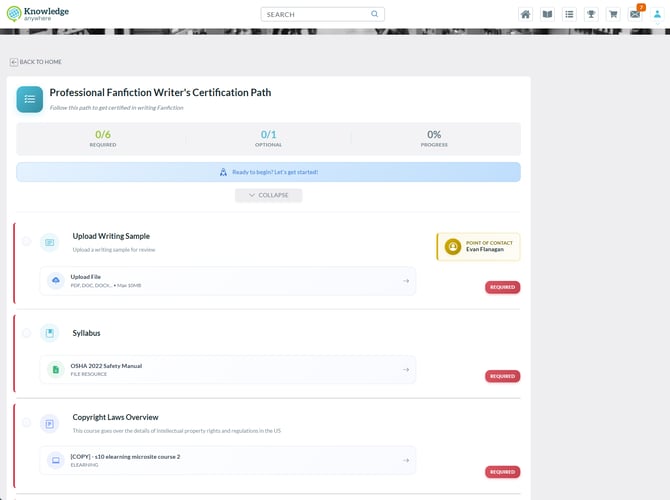
The checklist is presented in a clear, step-by-step format. Tasks may include:
-
Courses/Learning Paths you need to take
-
Documents or policies you need to review and acknowledge
-
Forms you may need to fill out or upload
-
Introductions or meetings you should schedule
Next to each task, you’ll see a status indicator (Not Started, In Progress, or Completed), so you know exactly where you stand.
Completing Tasks
To work through your checklist:
-
Click on a task to open the course, document, or form.
-
Follow the instructions provided for that task.
-
Mark the task complete when finished. In many cases, tasks like course completions will automatically update.
This way, you never have to guess if something is done, it’s all tracked for you.
Tracking Your Progress
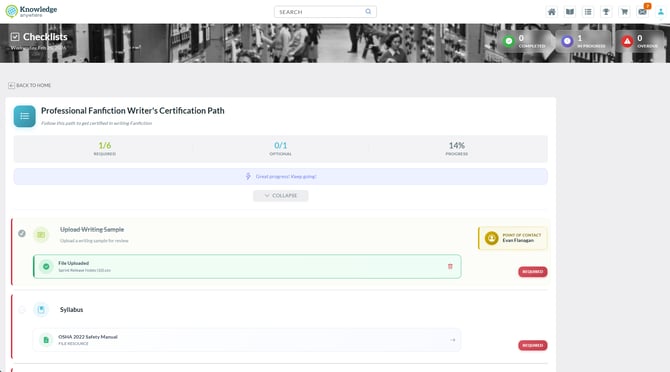
At the top of your checklist, you’ll see a progress bar that updates as you complete tasks. This gives you a clear view of how far you’ve come and what’s left.
If any task has a deadline, it will be clearly marked so you can prioritize accordingly.
Staying on Track with Notifications
The LMS will send you reminders and alerts if:
-
A task is due soon
-
A task is overdue
-
You have new onboarding requirements assigned
These notifications will appear both inside the LMS and (in some cases) via email, so you never miss an important step.
Note: notification emails are sent from noreply@knowledgeanywhere.com.
Finishing Your Checklist
Once you’ve completed every task, your checklist will show as 100% complete. You may also see a confirmation message or badge celebrating your accomplishment.
From here, you can continue with other assigned courses, explore learning paths, or access ongoing training opportunities.
Need Help?
If you have questions or run into issues with your checklist, you can:
-
Visit the Help Center inside the LMS
-
Reach out to your HR team or manager
-
Contact our support team at support@knoweldgeanywhere.com for technical assistance