![2617210b577d672136104a4f5660e04f07acf843-removebg-preview.png]](https://help.knowledgeanywhere.com/hs-fs/hubfs/2617210b577d672136104a4f5660e04f07acf843-removebg-preview.png?height=40&name=2617210b577d672136104a4f5660e04f07acf843-removebg-preview.png)
Overview
Notifications are configured for each Certification on the Notifications tab. Each notification type can be turned on or off independently. When a notification is off, it is never sent, regardless of what occurs in the system.
Notifications fall into two categories:
- Learner Notifications — Sent directly to learners regarding their own certifications.
- Administrator Notifications — Sent to designated administrators.
Note: The system prevents duplicate notifications. If a notification has already been sent for a given event, a second copy will not be sent even if the system processes the same record again.
Table of Contents
- Configuring Notifications
- Learner Notifications: Milestones
- Learner Notifications: Expiration Reminders
- Administrator Notifications: Configuring Administrator Recipients
- Administrator Notifications: Types
- How Notifications Are Processed
- Notification Reference Table
- Editing Notification Messages
Configuring Notifications
To configure Notifications, browse to a Certification and click on the Notifications tab.
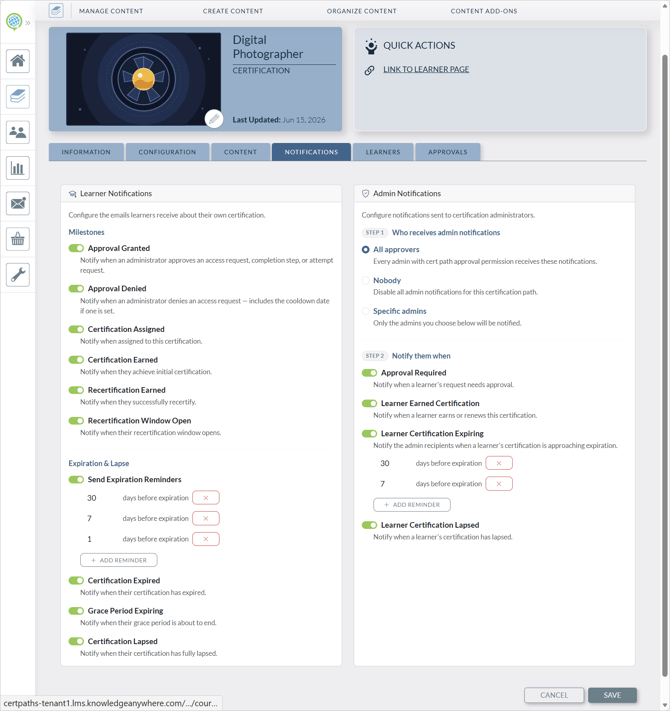
Note: Some notifications are processed on a daily basis and may not be sent immediately when a triggering event occurs
Learner Notifications: Milestones
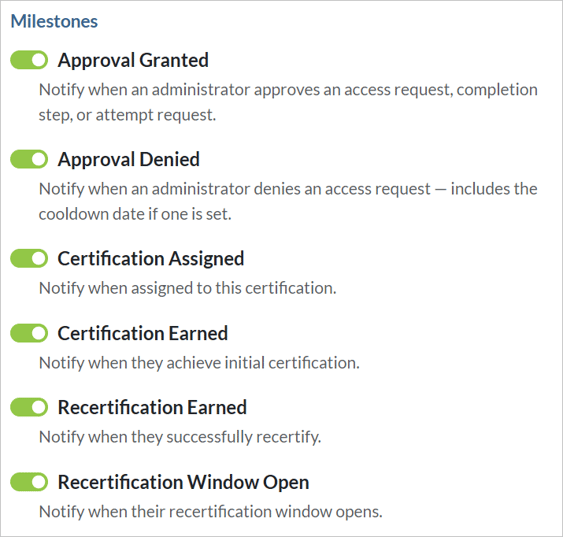
The following e-mail notifications can be sent to learners when Milestones for their certifications are reached. You can turn each notification on or off.
Learner Notifications: Expiration Reminders
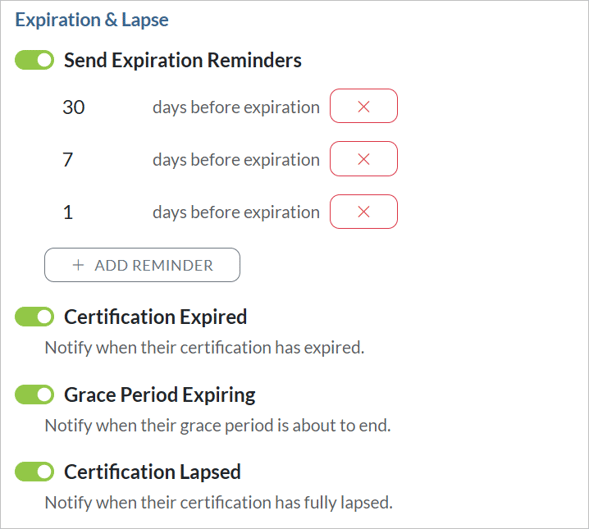
Expiration reminders are sent to learners regarding their certification’s expiration at designated times. You can turn the reminder schedule on or off entirely, and specify when expiration reminders are sent.
You can also activate notices when certifications expire or lapse, or when the grace period expires. The grace period is time granted between when a certification expires and when it is revoked.
Administrator Notifications: Configuring Administrator Recipients
Administrator notifications for a Certification are sent to designated administrators. You can configure who receives them.
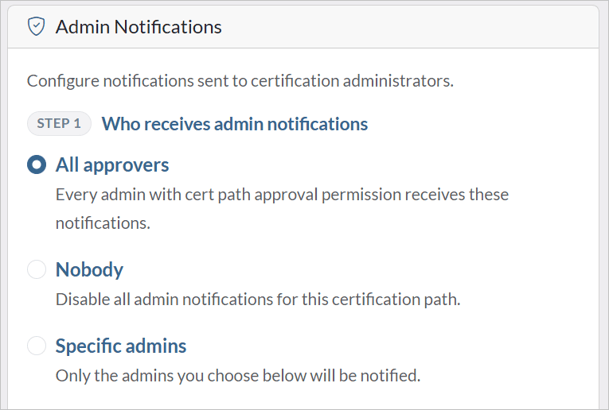
Administrator recipients can be configured in one of three modes:
- All Approvers — All administrators with permission to manage certification users receive the notification. This means all Global Administrators will receive the notification and all Microsite Administrators with rights to the microsite including the Certification will also receive the notification.
- Nobody – Disables all administrator Notifications for the Certification.
- Specific Recipients — A defined list of administrators receives the notification. If no specific list is configured, the system falls back to the tenant default setting.
Administrator Notifications: Types
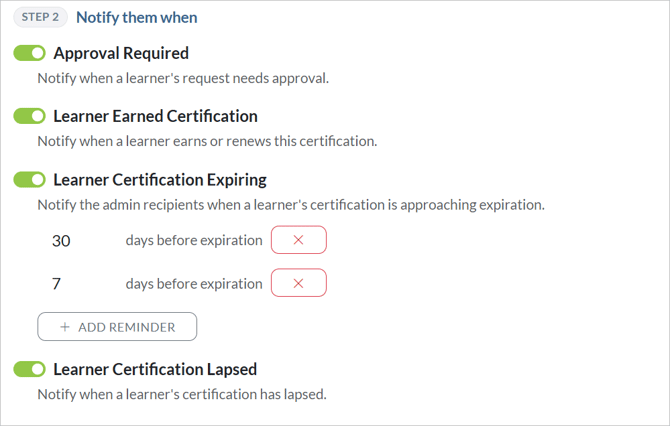
The following notifications can be sent to designated administrators. You can set when certification expiration notifications are sent.
How Notifications Are Processed
Notifications fall into two processing modes:
- Real-time — Sent when a specific action occurs (such as an administrator assigning a learner or approving a request). These are sent within minutes of the triggering action.
- Scheduled (daily) — Sent once per day by a scheduled background process that checks which learners have lifecycle events due on that day. This covers all expiration-related events, earned notifications, and lapsed notifications.
Note: Because scheduled notifications are processed once per day, there may be a delay of up to 24 hours between a lifecycle event occurring and the notification being sent. Real-time notifications such as assignment and approval decisions are not subject to this delay.
Notification Reference Table
The table below summarizes all notification types, who receives them, and when they are sent.
|
Certification |
Type |
Processing |
|
Certification Assigned |
Learner |
Real-time |
|
Approval Decision Granted |
Learner |
Real-time |
|
Certification Earned |
Learner |
Daily |
|
Recertification Earned |
Learner |
Daily |
|
Recertification Window Open |
Learner |
Daily |
|
Expiration Reminder (each configured day) |
Learner |
Daily |
|
Certification Expired |
Learner |
Daily |
|
Grace Period Expiring |
Learner |
Daily |
|
Certification Lapsed |
Learner |
Daily |
|
Approval Required |
Administrator |
Real-time |
|
Learner Earned Certification |
Administrator |
Daily |
|
Learner Certification Expiring |
Administrator |
Daily |
|
Learner Certification Lapsed |
Administrator |
Daily |
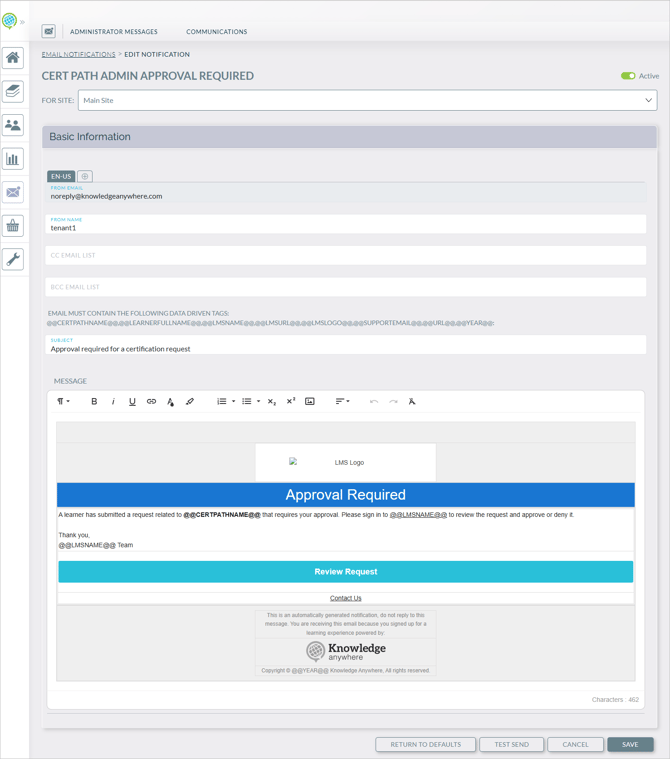
Editing Notification Messages
Like other notifications, Certification notification messages can be edited. Go to Communications > Email Notifications and click on the notification. See Site Messaging and Notifications for more details.